


Smart Related Content Inserter for WordPress
Smart Related Content Inserter for WordPress


Couldn't load pickup availability
Automatically Add Related Articles and Product Cards Throughout Your WordPress Content
Adding related articles manually to every blog post takes time, becomes difficult to maintain, and often results in inconsistent layouts across your website.
Smart Related Content Inserter for WordPress solves that problem by automatically inserting responsive rows of related articles and product-style posts throughout your content. Instead of adding recommendation blocks by hand, simply choose which H2 headings should display related content, and the plugin handles the rest automatically.
The plugin works with your existing WordPress posts and future content without permanently modifying your articles. Recommendation rows are generated when the page is viewed, keeping your original content clean while making it easier for readers to discover additional pages.
If you're looking for more tools to grow your website, browse our WordPress Plugins collection for plugins built specifically for bloggers, affiliate marketers, publishers, agencies, and content creators.
Increase Internal Clicks Without Manually Editing Every Article
One of the easiest ways to improve page views is by helping readers discover additional content while they're already engaged.
Smart Related Content Inserter automatically places attractive recommendation cards before selected H2 headings throughout your articles. These visual recommendations naturally encourage readers to continue exploring your website while reducing the time spent manually maintaining internal recommendation sections.
Separate Related Articles and Product Recommendations
Unlike most related posts plugins, Smart Related Content Inserter allows you to manage informational articles and product-style content independently.
You can configure completely separate placement schedules for ordinary articles and product posts, making it ideal for affiliate websites, buying guides, review sites, tutorials, and content-heavy blogs that want to naturally promote product recommendations alongside educational content.
Complete Control Over Placement
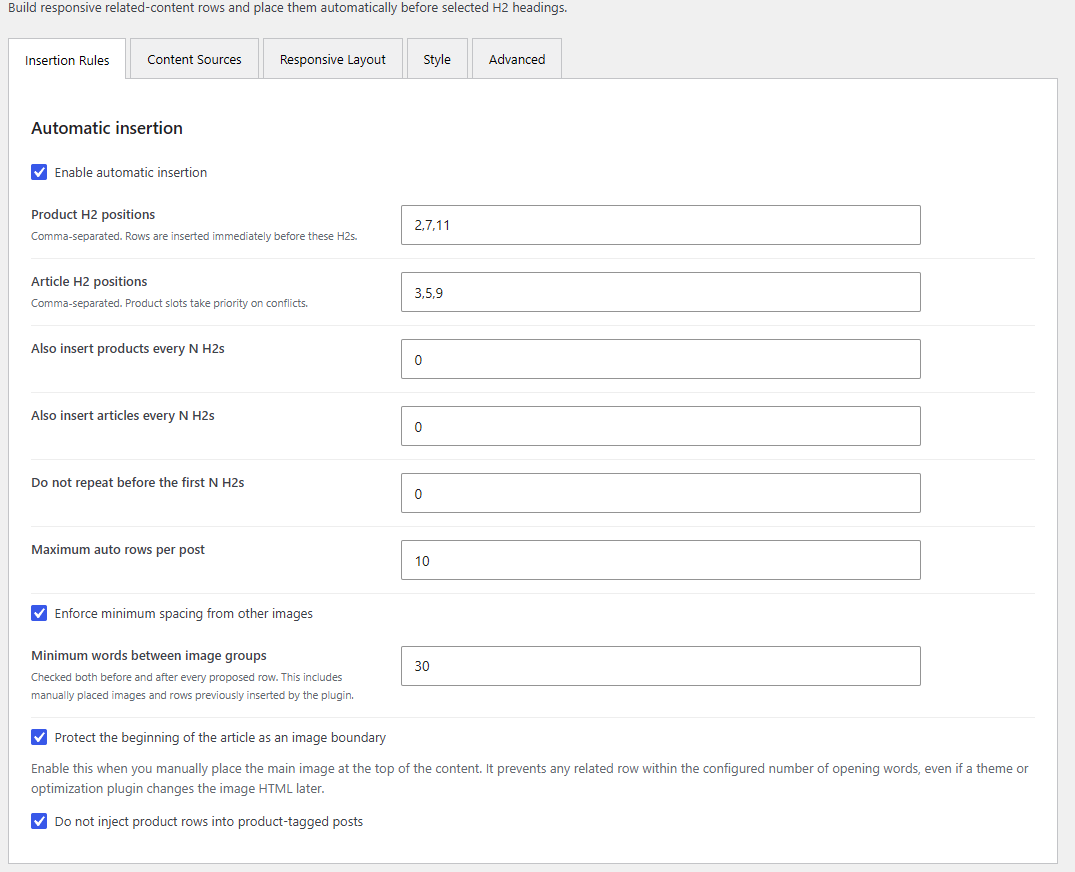
Choose the exact H2 headings where recommendation rows should appear, configure optional repeating intervals, control the maximum number of recommendation blocks per article, and automatically skip positions when there isn't enough room.
The plugin intelligently inserts recommendations before the selected headings while respecting your content structure.
Protect Your Existing Images
Recommendation rows should improve your articles, not clutter them.
Smart Related Content Inserter includes intelligent image-spacing protection that measures the visible words before and after nearby images. If a recommendation row would appear too close to manually inserted images, galleries, linked images, or opening images, that insertion point can be skipped automatically.
Built for Responsive Websites
Create completely different layouts for desktop, tablet, and mobile visitors.
Choose how many recommendation cards appear on each device, configure responsive grid columns, control maximum row widths, adjust spacing, customize image ratios, and create layouts that fit almost any modern WordPress theme.
Popular Features
- Automatic placement before selected H2 headings
- Separate article and product recommendation rows
- Independent H2 schedules
- Optional repeating insertion intervals
- Responsive desktop, tablet, and mobile layouts
- Category and tag relationship matching
- Product recommendation support using standard WordPress posts
- Duplicate recommendation prevention
- Intelligent image-spacing protection
- Three image sizing modes
- Responsive featured images
- Custom headings and styling controls
- Manual shortcodes
- Custom CSS support
- No WooCommerce required
- No external API required
Perfect For
- Affiliate marketers
- Professional bloggers
- Niche websites
- Magazine-style publishers
- Recipe websites
- Tutorial websites
- SEO agencies
- Content publishers
- News websites
- Large WordPress blogs
Works Great Alongside Our Other WordPress Plugins
Smart Related Content Inserter pairs perfectly with our Internal Link Reviewer, which helps identify new internal linking opportunities, and Auto Linked Featured Images, which automatically displays featured images beside internal links.
You can also combine it with Broken Link Cleanup Pro to keep your older articles free of broken links and SearchLift AI to optimize existing content using real Google Search Console data.
Together, these plugins help create a more engaging, better connected, and easier-to-manage WordPress website.
Lifetime License and Free Future Updates
Your purchase includes a lifetime license for one website. Need to use the plugin on multiple websites? Simply increase the quantity during checkout. A quantity of three provides lifetime licenses for three separate websites.
Every purchase also includes free lifetime updates. Whenever a new version is released, you'll automatically receive an email with download instructions at no additional cost.
Requirements
- WordPress 6.2 or newer
- PHP 7.4 or newer
- No WooCommerce required
- No external APIs or monthly subscriptions
Instant Digital Download
Your purchase includes the downloadable WordPress plugin ZIP file. Upload it through the WordPress Plugins screen, choose your H2 placement rules, configure your recommendation settings, and start automatically displaying related articles and product cards throughout your WordPress content in just a few minutes.
Want a Complete Walkthrough?
If you'd like to see exactly how I use Smart Related Content Inserter on my own WordPress websites, I've put together a detailed guide covering installation, every setting, recommended configurations, troubleshooting, best practices, and real-world examples. Whether you're setting it up for the first time or looking to fine-tune your recommendations, this guide will help you get the most out of the plugin.


Let customers speak for us
A good file, editable and worked as intended. Thanks.

cute easter download and easy for me to download!

I was worried a plugin like this owuld bog down the sever my site uses but i watched while it ran and it barely touched it so that was a big plus.... it did work to find every youtube video i had ever added to any post on my WP site, and to my surpise i had 19 videos that no longer worked! this helped me from that emberrsment of having that many broken videos on my site

love this, got this design to engrave on a leather made hat for my son who just got his cdl design is perfect!

set up was easy, just adding open ai api key and set my total mothly cost limit to 1 dollar which is PLENTY this plugin uses ai to barely cost anything to work well. love this and saves me alot of time and headache with wp categories, this does all the heavy work for me

I came across the youtube video going over this plugin and had to check it out as it seemed like an honest video that actually went over it all.... it was super simple to set up and i have always been bad with internal links like i product have almost 0.... this plugin today alone has helped me add over 200 amazing internal links, i have only clicked deny on 7 out of around 200+ reccomendations. They are very good recccomendations and not spammy. perfect and helpful thank you so kindly for making this!! -Jim M

Website was user-friendly and downloading the purchased image was so easy! I'll definitely shop here again!!

Set up was cake. No issues at all. Works pretty well right upon installing. Love the settings it gives to customize the way I need to. Very useful!

I have been using another big name plugin that is similar to this that was costing me 199 per year and I have three Wp sites so that is 600 a year. Decided to give this a go since it’s cheap and one time cost aside from the open ai api which isn’t really that much This plugin is even easier to use than the big guys once set up. I liked it enough so downloaded it two more times so add to my other two sites. Here’s to saving money and still getting good results I need!

I have a wordpress site for 3 years now and i have a few ranking pages but really struggle over all.. i suck at seo and when it comes to understaning googles search consolne i am totally lost! This plugin did take me about 25 min to set up because i dont understand APIs and such i had to set up with google and open ai, but i did get it done which the plugin has very nice built in directions... Once i did get it set up, this thing is worth so much more than what they charge for it not kidding at all. I tried something else a few months ago and it was like $399 per year! i love this one is a one time buy and its actually affordable for someone like me who is struggling to get anywhrre with my wp site. This thing has helped me quite a bit already now couple weeks in using it and it has helped me fix and make 19 of my blog posts so much better and now imprssions are starting to increase so i can see its legit.. its not guessing on anything its literally using data google gives that people are looking for and it helps me to impliement these fixes on my site literally by clicking an accept but.. could not of made it any easier. thank you so much again and many many thanks to you
I seen the creator of this post on reddit last night and thought i would give it a try, to be honest im actually very impressed by this! i have used it to already add over 130 internal links to my website that i couldnt believe i had missed myself but i sure enough did. To me this plugin is GOLD!!!
My 8 year old wanted to 3d print a dragon and we looked at a lot of ones online but this is the one he liked the best. Pleased with the download and it printed very nicely


Thank you SO much for making this!! I am a new blogger and don’t have loads of money for those big companies that charge a lot of money yearly. I was skeptical at first but watching your YouTube video on it allowed me to see how it worked and really sold me. It is super easy to use and helped me find over 400 internal link chances on my website!!!! A few of them I did deny as they didn’t need to go but the bulk majority of them made perfect sense!! This is a huge help. Thank you so so so much
i am new to the truck driving world just getting out of HS i need to learn all the questions and the Why for the answers and this is the best thing out there i have found, its worth way more than the $10 i paid for sure! helped me pass! thanks yall!
